
 UPDF
UPDF
UPDF: how a pricing page breaks trust before the user pays
UPDF is an AI-powered PDF editor for different platforms. It competes directly with Adobe Acrobat — and positions itself as the affordable, smarter alternative. The pricing page is where that promise either holds or breaks. I opened it as a new user trying to buy. I couldn't figure out what I was buying. This is what I found — and what I'd do differently.
This redesign is based on publicly available information and UX best practices. It does not reflect UPDF's internal business decisions.
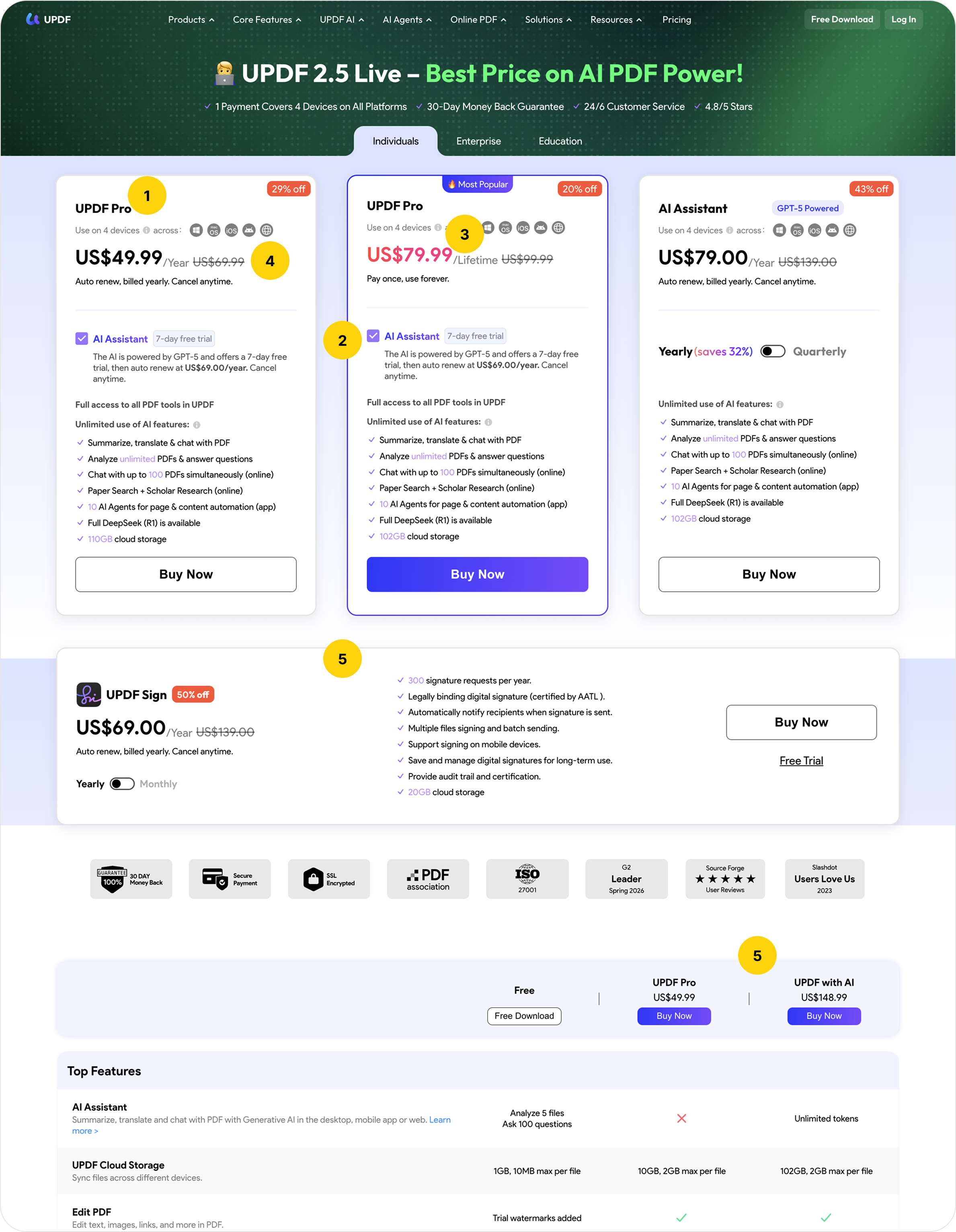
The one job of a pricing page
A user arrives at a pricing page already interested. They've read about the product. They've compared alternatives. They came here for one thing: to understand what to buy and why.
The page has 30 seconds to answer that.
This one doesn't.
What I found
Issue 1: The page doesn't know what it's selling
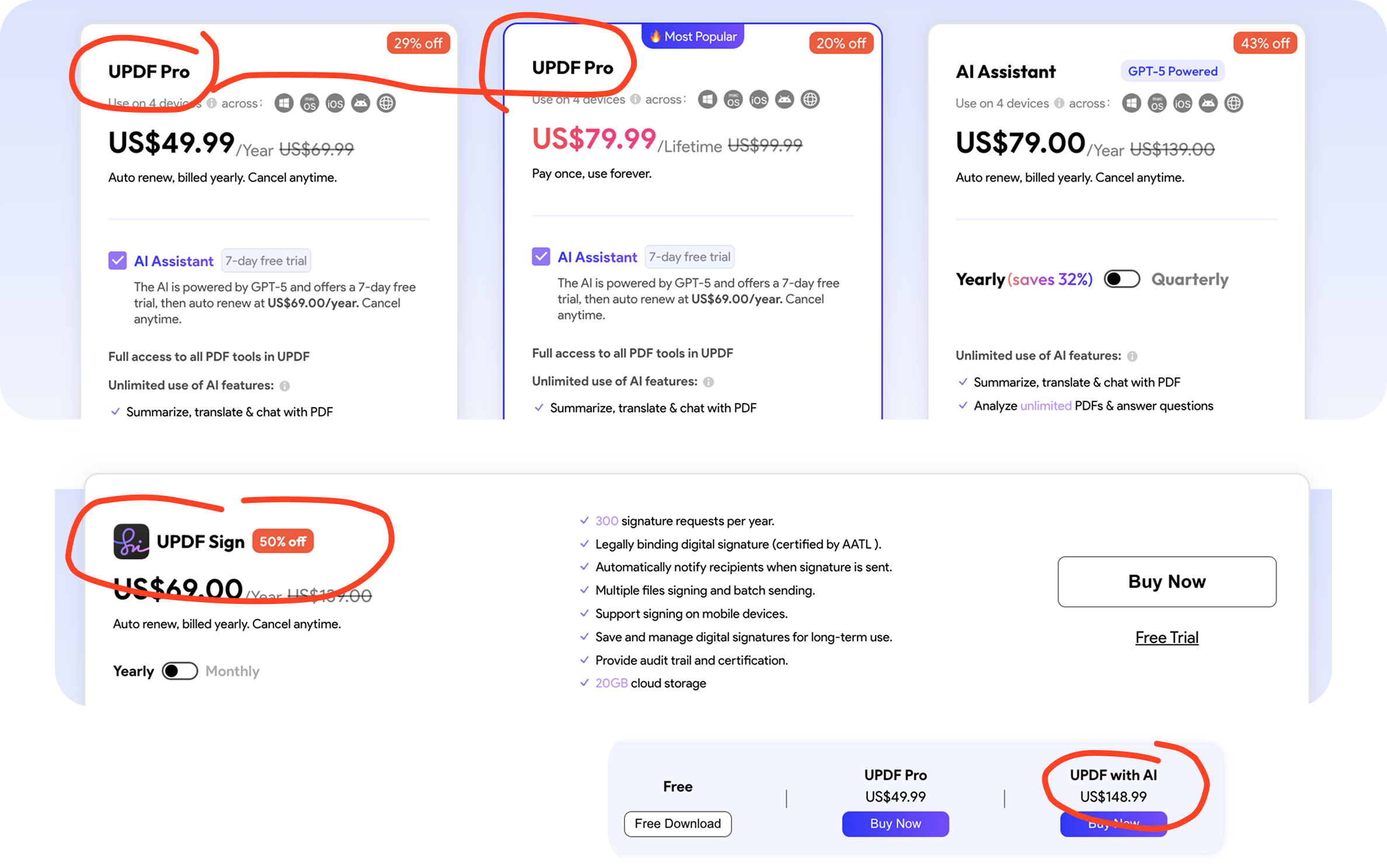
Two plans share the same name: UPDF Pro. One costs $49.99/year, the other $79.99 — billed once, for life. The only visible difference is a small grey label below the price. The feature lists look identical at first glance.
I spent several minutes trying to figure out why do I see one plan twice.
A user scanning three cards side by side sees: Pro, Pro, AI Assistant. Two identical names, one unfamiliar one. Before they can choose a plan, they have to figure out why the same product has two different prices. That question shouldn't exist.
There is also a fourth plan — UPDF Sign — positioned below the main three with no clear relationship to them. And a fifth plan, "UPDF with AI" priced at $148.99, which appears only in the comparison table at the bottom. It has no card. No CTA. No explanation. It exists in the table as if the user already knows what it is.
Five pricing options. Four cards. One ghost plan. No hierarchy at all.

Issue 2: AI is presented as four different things on the same page
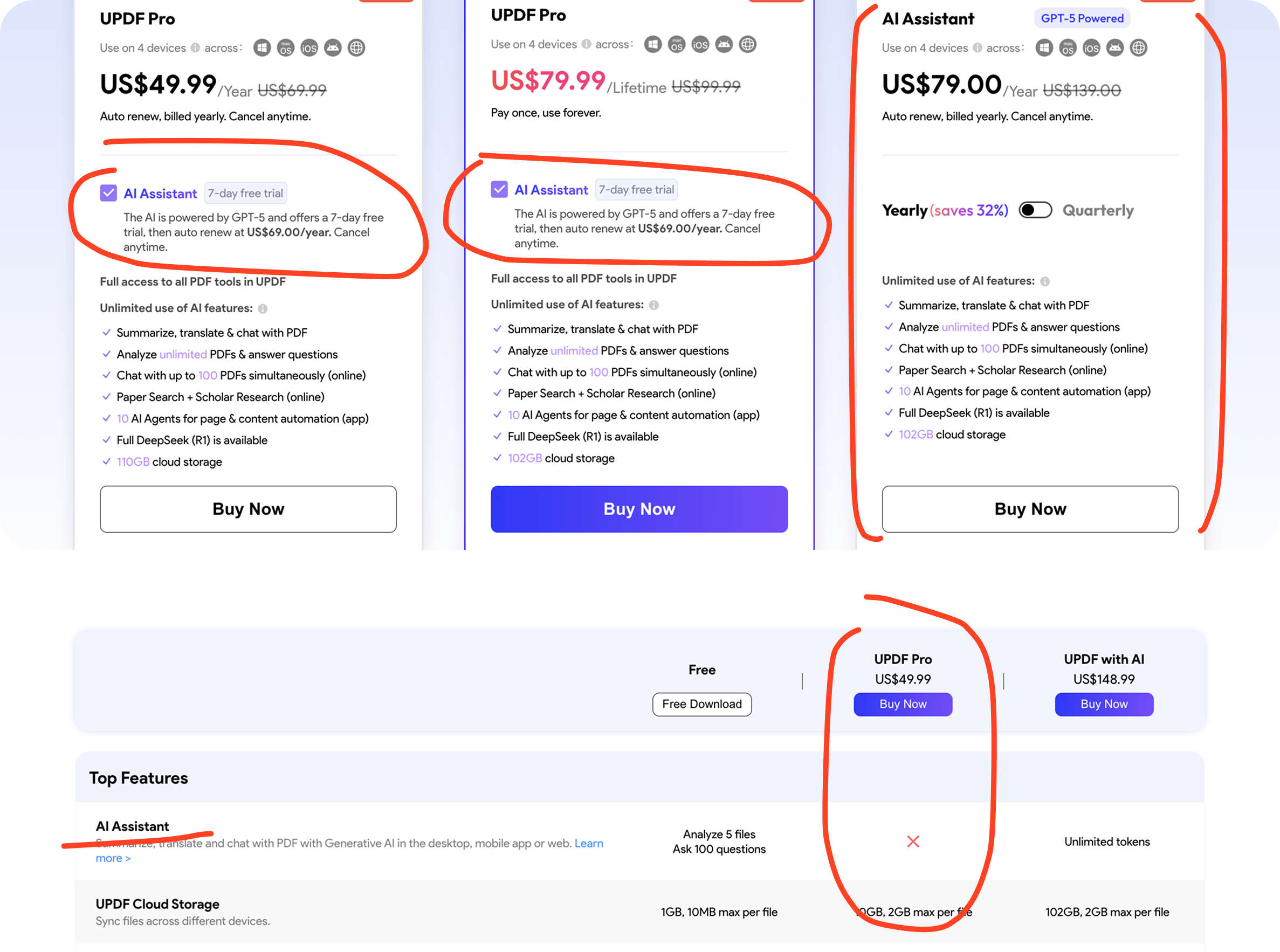
This is the most damaging issue on the page.
The AI Assistant appears as: a checkbox inside the Pro plan cards, a standalone plan card, a row in the comparison table, and a concept explained in the FAQ. Each time, it behaves differently.
On the Pro cards, the AI checkbox is checked by default. The feature list shows AI capabilities. The price shows $49.99. A user reading this card believes AI is included because - honestly - the checkbox doesn't look like a functional element. It's a nice Ui element that visually tells the user - this feature is included. When you uncheck the box, the feature list changes: storage drops from 110GB to 10GB. But the price stays at $49.99! The card was never showing what $49.99 actually buys.
Scroll to the comparison table. AI is marked as not included in the Pro $49.99 plan — which is the correct information. But it contradicts what the card showed by default.
Read the FAQ. It describes AI storage as part of the plan totals. Which again contradicts the checkbox mechanic.
There is also a free tier with limited AI access — 5 PDFs, 100 questions per month. This is mentioned only in the FAQ. It doesn't appear anywhere near the pricing cards. A user who isn't ready to commit has no visible path. So they leave.
The AI Assistant standalone card has no explanation of who it's for. It's positioned alongside complete plans — PDF tools included — with no signal that it's designed for existing UPDF users who want to add AI. A new user sees it and wonders why they'd pay $79 for AI alone when the Pro card appears to include it for $49.99.

Issue 3: "Pay once, use forever" — except for the part that renews every year
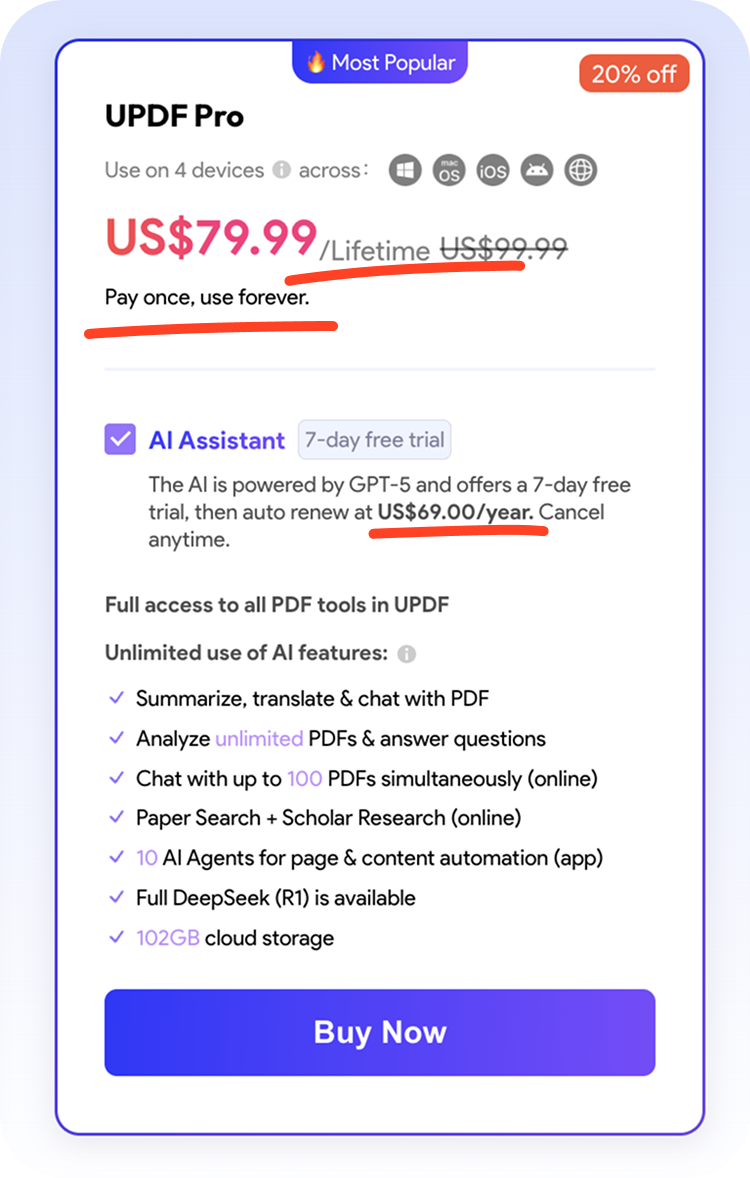
The lifetime Pro card carries a clear headline: "Pay once, use forever."
The AI checkbox on the same card — checked by default — adds a subscription: "auto renew at US$69.00/year. Cancel anytime."
There is no lifetime AI option: AI is always billed yearly, regardless of which plan the user chooses. This is confirmed in UPDF's own subscription agreement, but the user will only see this info when they go in documentation that is hidden on the page. It is never stated on the pricing page.
A user who chooses the lifetime plan specifically because they want to avoid recurring payments checks the AI box because it looks like a feature. They have now enrolled in a permanent annual subscription attached to a product they bought as a one-time purchase. They find out when the first renewal charge appears.
The card's own headline makes a promise, but the checkbox breaks it. Nothing on the page resolves that contradiction.
Issue 4: The real price is never shown
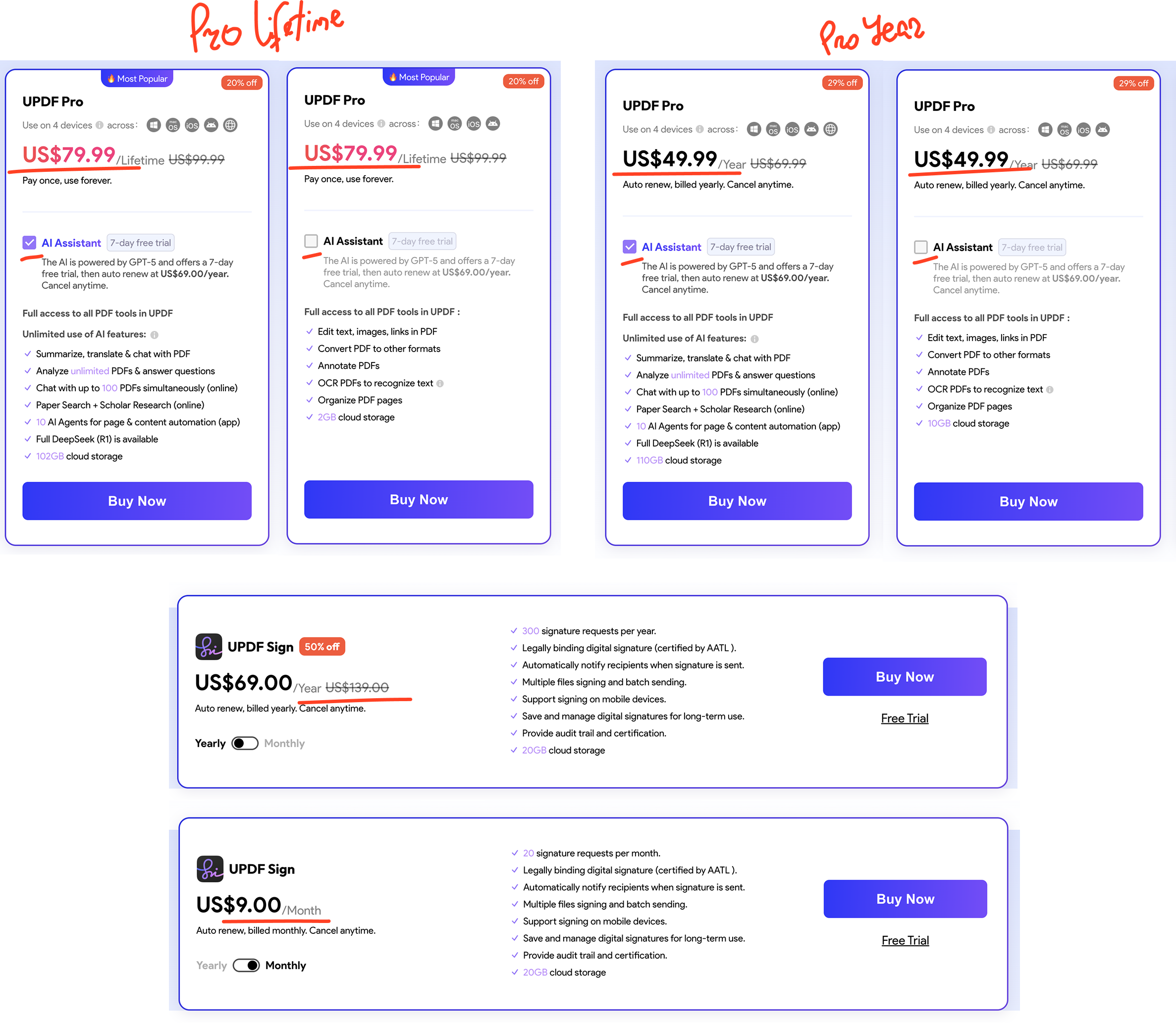
When the AI checkbox is checked on the annual Pro card, the price displayed is $49.99. The checkbox fine print says AI renews at $69/year. The actual cost — $118.99/year — is never shown anywhere on the page.
The checkbox defaults to checked. The user sees $49.99. They click Buy Now. The real price appears at checkout.
This is the same pattern across every card. Crossed-out original prices — $69.99, $99.99, $139.00 — appear as if there's a standard price being discounted. There is no undiscounted version of any plan available on the page. The "original" prices exist only to create a discount impression.
The discount percentages are calculated against different baselines across cards. 43% off on the AI Assistant yearly. 26% off on the quarterly. These numbers reference different anchors that never appear anywhere on the page. The user cannot verify a single claimed saving.
The UPDF Sign card claims 50% off from $139. But the monthly plan costs $9 — $108 annualised. The "original" $139 annual price has no basis in any plan shown on the page.
The same combination of PDF tools and AI appears at three different prices depending on where you look: $118.99 if you use the Pro card checkbox, $148.99 in the comparison table, $79 for the AI-only card. These represent different configurations — but that's never explained.
Issue 5: The page wasn't built as one document
- The FAQ references "premium individual account." No plan on the page uses the word Premium.
- The FAQ describes AI storage as included in plan totals. The cards treat AI as an optional add-on.
- The subscription agreement lists monthly, quarterly, half-year, and yearly plans. The pricing page shows only yearly & lifetime for Pro. The quarterly option exists only on the AI Assistant card. Monthly exists only on the Sign card.
- Different sections of this page were written or updated at different times. Nobody reconciled them into a single, coherent user experience. The result is a page the user cannot trust even when they read it carefully.

UX redesign proposal: information architecture & decision logic
The goal isn't to make this page look better. It's to make it answer one question clearly:
What should I buy?
Compare all features
Expand any section to see the full details.
| Feature | Free | UPDF | UPDF + AI |
|---|---|---|---|
| PDF Tools | |||
| Edit text, images, links | Trial watermark | ✓ | ✓ |
| Convert PDF (Word, Excel, PPT…) | 2/day | Unlimited | Unlimited |
| OCR — scanned PDF to text | 5 uses | ✓ | ✓ |
| Cloud storage | 1GB | 10GB | 110GB |
| AI Features | |||
| Summarise, translate & chat with PDF | 100 questions/mo | 100 questions/mo | Unlimited |
| PDFs analysed per month | 5 PDFs | 5 PDFs | Unlimited |
| AI billing model | — | — | +$69/yr, always yearly |
Frequently asked questions
This redesign doesn't change what UPDF sells or how they price AI. Charging for AI separately is a legitimate business decision — AI has real variable costs. Making that decision invisible to the user at the moment of purchase is not legitimate. The redesign changes the communication, not the business model.
Three questions I'd ask before designing any pricing page
- Can a new user name all the plans and explain the difference between them in 30 seconds?
If not, the problem is architecture — not copy, not color, not button placement. Redesigning the surface without fixing the structure produces a cleaner version of the same confusion.
For UPDF: two plans share a name, one plan exists only in a table, and AI behaves differently in every section of the page. A user can't answer this question. That has to be resolved before anything else.
- Does the page show the real price — the number that will appear on the user's billing statement?
Not the headline price. Not the price before an add-on checkbox is enabled. Not a price calculated against an original that doesn't exist anywhere. The number the user will actually pay.
Trust is built or lost at the moment of purchase. A user who discovers the real price at checkout — or in their email after the fact — doesn't just feel surprised. They feel deceived. That feeling doesn't convert to loyalty.
- Does the page make the same promise in every section?
Cards, comparison table, FAQ, subscription agreement — do they all describe the same product, the same inclusions, the same billing model?
For UPDF, the answer is no in every section. AI is included in some places and optional in others. "Lifetime" means different things depending on whether you're reading the card or the checkbox. "Premium" appears in the FAQ for a plan that doesn't exist on the page.
A pricing page that contradicts itself isn't just confusing. It signals that the company hasn't thought carefully about what they're selling — or to whom.
Sources:
- Patrick Campbell, ProfitWell — "Pricing, Retention, and Growth Strategies That Work"
- Price Intelligently / SaaStock — "The SaaS Pricing Trap: When Too Many Tiers Kill Conversions"
- Iyengar, S.S. & Lepper, M.R. (2000) — "When Choice Is Demotivating: Can One Desire Too Much of a Good Thing?" — Journal of Personality and Social Psychology, Vol. 79, pp. 995–1006
- HubSpot — "How Redesigning HubSpot's Pricing Page Increased MQL Conversions by 165% & Free Sign-Ups by 89%"
- UPDF Software Subscription Agreement
- UPDF Pricing Page — Individuals
- UPDF FAQ — Pricing page FAQ section
